Instruments
An instrument is where a track's notes go when the song plays in real time: a MIDI device and channel, or FluidSynth. This page covers the Instruments page and the instrument editor.
What an Instrument Is
An instrument names a device and a channel. The device is one of this computer's MIDI output ports, with a channel on it from 1 to 16, or FluidSynth, the free software synthesizer the tracker starts by itself. Each track chooses an instrument in its track editor, and a track with none is left out of real-time playback. Two instruments may share a device and a channel, so one synthesizer can play every track, or each track can have a voice of its own.
An instrument can also choose a General MIDI sound, which FluidSynth plays and the MIDI (General MIDI) export gives the instrument's tracks. An instrument with a sound but no device is there for that export alone, and its tracks are silent in real time. When no track plays through an instrument with a device, playback doesn't start, and a dialog says why. No other export reads an instrument, since a Live set has instruments of its own.
FluidSynth Instruments
An instrument whose Device is *FluidSynth plays through FluidSynth, as FluidSynth describes. Its Channel shows (auto), because each track through FluidSynth gets a channel of its own, as the MIDI (General MIDI) export assigns them: channel 10 for a drum track, where FluidSynth plays drums, and channels 1 to 16 in turn for the rest. Each clip starts by choosing the track's General MIDI sound.
Every example plays this way as it comes: its Real Time switch is on, and every track plays through a FluidSynth instrument, with a drum kit for the drum tracks, so opening an example and pressing Space on Arrange's corner plays it. A new set has no instruments until you add them.
Missing Devices
When a set opens whose tracks play through an instrument that can't sound on this computer, a dialog says which: FluidSynth when it isn't installed, and each instrument whose MIDI port isn't connected, such as a set saved on another computer with IAC Driver Bus 1. The set keeps every device, so the set plays again wherever the device is, and the Instruments page can choose another.
Instruments Page
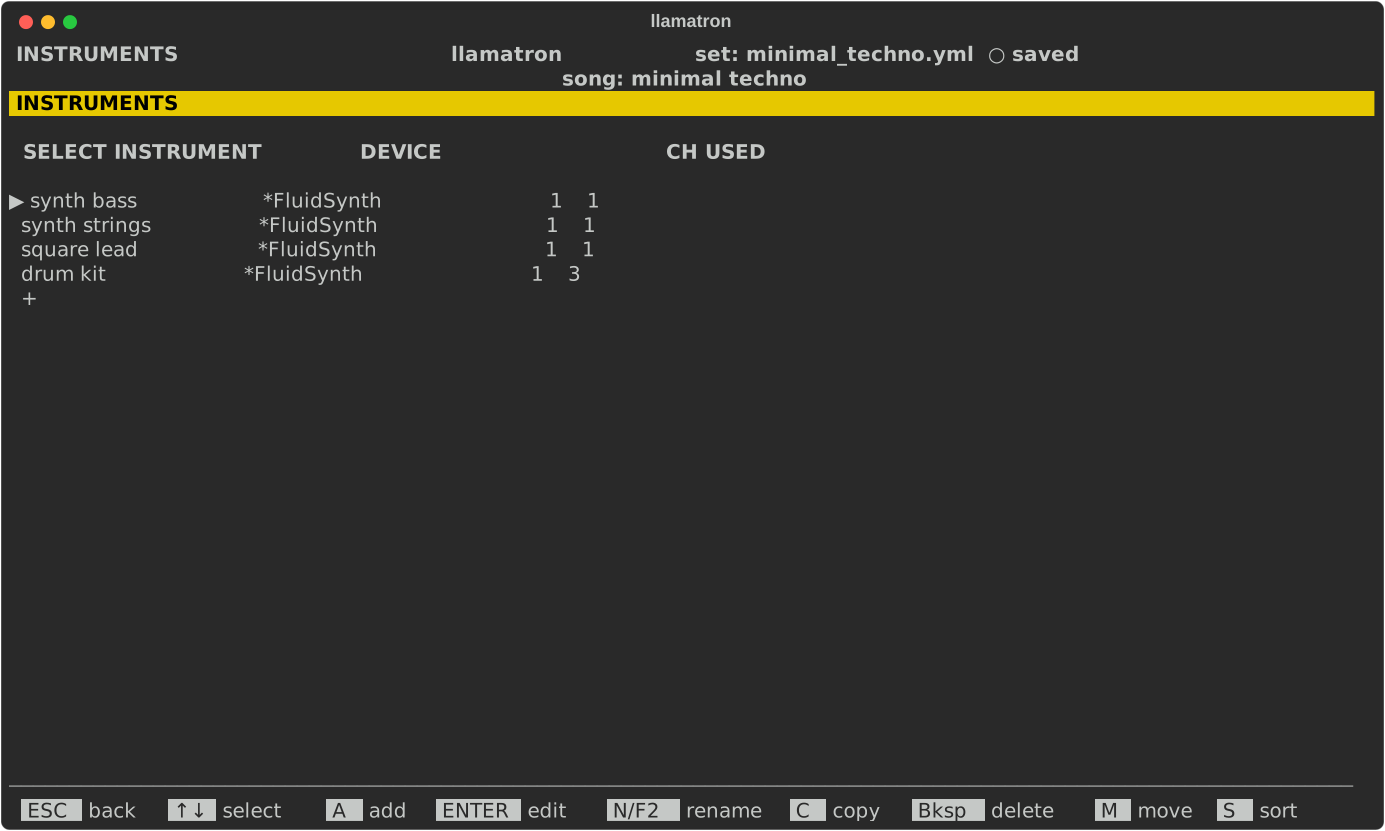
Press I on the main screen to open the Instruments page. The list shows each instrument's device and channel, and how many tracks play through it. Adding the first instrument turns the main screen's Real Time switch on, and deleting the last turns it off.
| Key | What it does |
|---|---|
A | Adds an instrument with no device yet, named instrument-1 and so on, and opens it. |
ENTER | Opens the instrument. |
C | Copies the instrument to the end of the list. |
N | Renames the instrument, updating every track that chose it. |
M | Picks the instrument up: ↑↓ carry it, and ENTER drops it. |
S | Sorts the instruments by name. |
Bksp | Deletes the instrument, once no track uses it. |
Instrument Editor
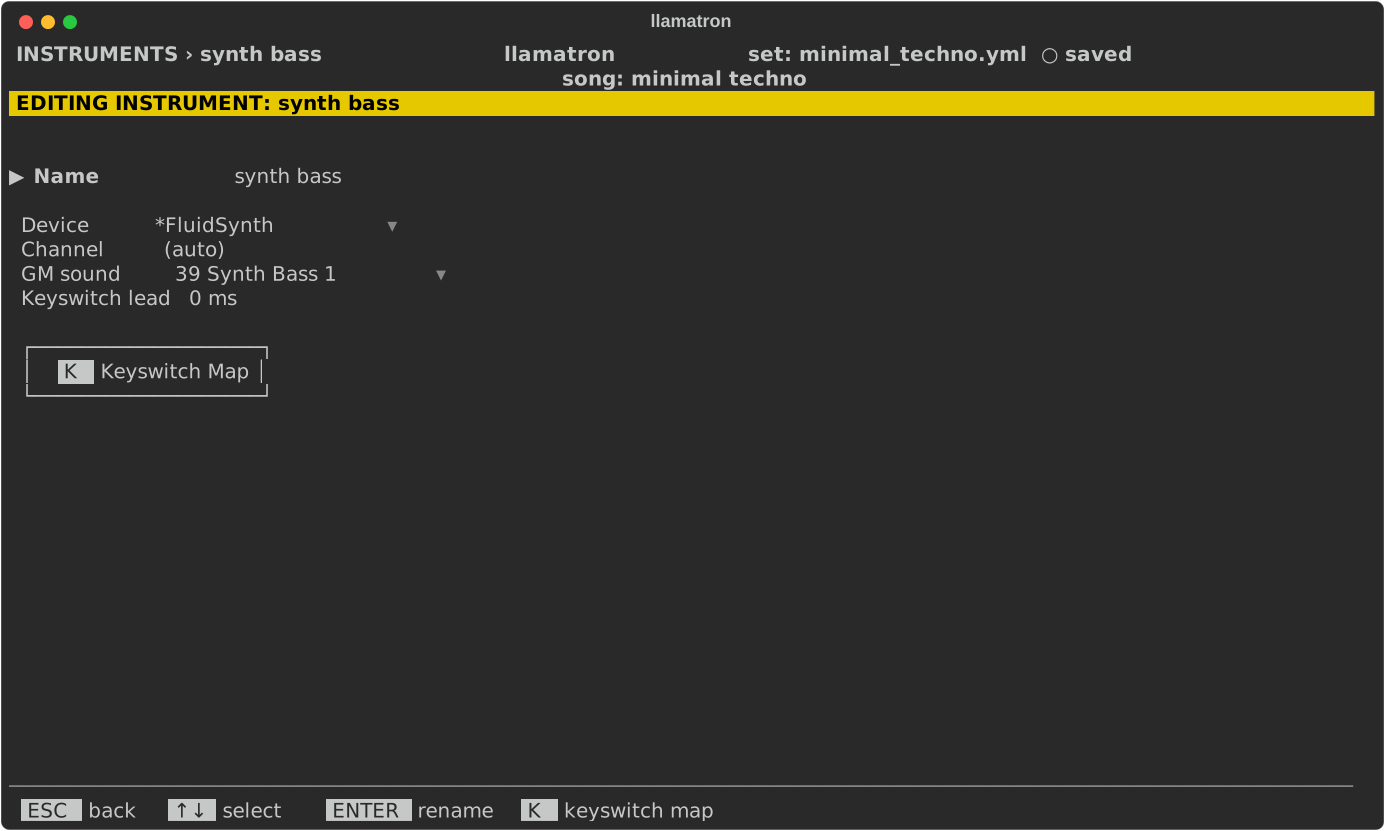
| Setting | What it does |
|---|---|
| Name | ENTER renames the instrument. |
| Device | The MIDI output port, chosen with ENTER from (none), then *FluidSynth, then the ports this computer has now, sorted. A port the set names that has disconnected is still offered, so that the set opens without the port and keeps it. Bksp sets none. |
| Channel | 1 to 16, as the device numbers them. [ and ] step it, and ENTER types it. With *FluidSynth it shows (auto) and can't be changed, since each track gets its own channel. |
| GM sound | One of General MIDI's 128 sounds, or (none). ENTER opens a picker of General MIDI's sixteen families, two to a page, with (none) above them, where Tab and Shift+Tab turn the pages; [ and ] step through the sounds by number, and Bksp sets none. A drum track always plays channel 10's drum kit. |
| Keyswitch lead | How many milliseconds before its note a keyswitch is sent, 0 to 500, 0 ms unless set. [ and ] step it, and ENTER types it. See Keyswitches below. |
| Keyswitch Map | A button: ENTER on it, or K from any field, opens the instrument's Keyswitch Map. See Keyswitches below. |
Keyswitches
A keyswitch is a note that a plugin reads as an order to change how it plays, such as a string library's sustain, staccato and pizzicato, rather than as a note to sound. An instrument holds a Keyswitch Map of ten slots, numbered 0 to 9, each with a name and the note that switches it. A pattern's steps name slots, on the Keyswitch row described in Patterns, so the same pattern works with whatever notes the instrument's plugin uses.
Keyswitch Map
| Key | What it does |
|---|---|
| Up, Down | Move through the ten slots, and down from the last slot to the OK and CANCEL buttons. |
| Left, Right | Move between the slot's name and the slot's note; the triangle stands before the one the cursor is on. Up and Down keep that place, so one slot after another can be named. |
N or F2 | Names the slot, from the name or the note. A blank name leaves the slot without one. |
ENTER | On a slot's name, names the slot. On a slot's note, opens the note picker. On a button, presses it. |
Bksp | Empties the slot, its name and its note. |
O | OK: the ten slots go into the instrument together, as one undo step. |
ESC | CANCEL: nothing changes. |
A note is written in the set's octave labels with its MIDI number, such as C0 (24). A slot may have a name and no note yet; a step that names such a slot plays nothing for it until the slot has a note.
Note Picker
The note picker is drawn over the Keyswitch Map and shows one octave of keys, with the octave picked apart from the key. Left and Right move along the keys of the octave, Up and Down change the octave, ENTER takes the note and ESC closes the picker with nothing changed. The picker opens on the slot's own note. For a slot with no note, it opens a half step above the highest note in the map, or on the lowest C when the map is empty.
How Keyswitches Play
A step's keyswitch notes start at the same moment as the step's note and are sent before it, and each lasts as long as the note is written, ties included. For a plugin that needs the keyswitch earlier, the instrument's Keyswitch lead sends every keyswitch that many milliseconds before its note. A keyswitch moves with its note when a groove, a Rush or a Drag moves the note. Nothing else touches a keyswitch: a track's Transpose, the scale, a strum and every other generator leave the note exactly as the map holds it, and its velocity is always 100.
Keyswitches go to an instrument that plays through a MIDI port, and into the MIDI file, MIDI stems, MIDI clips and Ableton Live set exports. An instrument that plays through FluidSynth sends none, and the General MIDI file and the WAV file leave them out, since a General MIDI player would sound each keyswitch as a low note.